Developer portfolio
A free developer portfolio website that shows what you've built
A developer portfolio is a page that shows the software you have built, the tools you use and how to reach you. With The Digital Profile you can publish one for free in about five minutes, with project links, skills, experience and a downloadable résumé, at thedigitalprofile.com/yourname.
By Yuvraj Karna, founder of The Digital Profile · Updated
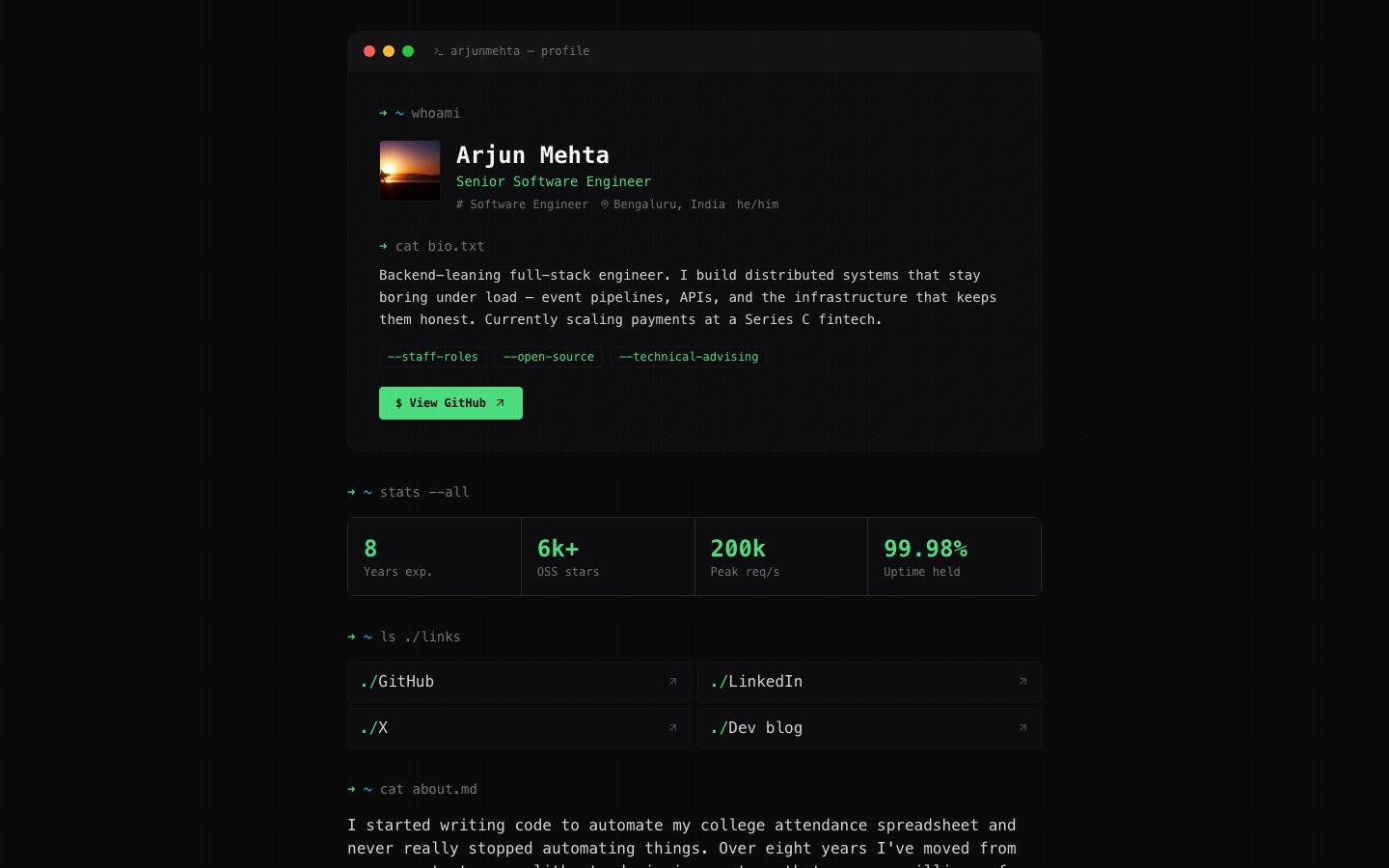
What should a developer portfolio include?
A developer portfolio should include a clear headline, three to six well-described projects with links to the code, the skills those projects prove, your experience, links to where your work lives, a way to contact you and a downloadable résumé. Everything else is optional.
- A one-line headline
- Your role and focus in under ten words, such as "Backend engineer working on payment APIs". It is the first thing a recruiter reads.
- Three to six projects
- Each with the problem, what you built, your part in it, the stack, the result, and links to the code and a live demo where one exists.
- Skills you can be interviewed on
- Languages, frameworks and infrastructure you have used for real work. A short, true list reads better than a long one.
- Experience
- Roles, companies and dates, with one line of impact for each. Internships, open-source maintenance and freelance work count.
- Links to where your work lives
- GitHub or GitLab, LinkedIn, Stack Overflow, a blog, conference talks or packages you publish.
- How to reach you, and for what
- An email address or contact link, and what you are open to: full-time roles, freelance projects or open-source collaboration.
- A downloadable résumé
- Many hiring processes still need a file. Keep one next to your portfolio so nobody has to ask.
How to describe a project so people read it
Describe each project in three short sentences: the problem, what you built and your part in it, and the result. Then add the stack as tags and link to the code. Specific numbers and outcomes are what make a project memorable.
- Title
- Queue-backed image resizer
- Description
- Product photos uploaded by sellers were slowing page loads. I built a background service that resizes each upload into four sizes and serves WebP to browsers that support it. Median product-page weight fell from 2.1 MB to 640 KB.
- Tags
- Node.jsRedisAWS S3Sharp
- Link
- The repository, or the live demo if there is one
Developer portfolio checklist
Before you share your portfolio, check it against this list. Each item is something a reviewer notices in the first minute.
- The headline says what you do, not just your job title.
- Every project says what problem it solved and what you did, not only which tools it used.
- Each project links to the code, a live demo, or both, and every link works.
- Your best project is first.
- Tutorial clones and course exercises are gone, or clearly marked as learning projects.
- Skills match the projects: anything listed appears somewhere in your work.
- Your experience has dates and one result per role.
- There is one clear way to contact you, and it says what you are looking for.
- Your résumé file is attached and matches the page.
- You have opened the page on a phone and it reads well.
How to build your developer portfolio with The Digital Profile
Sign up, claim a username, write a headline, add your projects and résumé, add your links, then pick a theme and publish. Each step happens in its own editor in the dashboard, and nothing needs code or hosting.
Sign up and claim your username
Sign up free with your Google account, then claim a username in Settings. Many developers use their GitHub handle, so the address reads thedigitalprofile.com/yourhandle.
Write your headline and bio
In Basic Info, put your role and focus in the tagline, a two-sentence bio below it, and what you are available for. The free professional bio generator can draft one from a few details.
Add your projects
Switch on the Portfolio section and add each project with a title, a description, a screenshot, tags for the stack, and a link to the repository or demo.
Fill in your résumé
In the Resume section, add your experience, education, skills and certifications, and upload your résumé as a PDF, DOC, DOCX or TXT file up to 10 MB.
Add your links
Add GitHub, LinkedIn and anywhere else your work lives. Themes that show link icons give GitHub, LinkedIn, X and YouTube links their own icon.
Pick a theme and publish
Terminal is a dark, monospace theme designed for developers; Prism and Ledger also suit technical work. Then set your page title and description in the SEO section and share the link.
Developer portfolio questions
Do developers need a portfolio if they already have a GitHub profile?
A GitHub profile shows code and activity; a portfolio explains it. A page that says what each project does, why it mattered and what you did on it, with links to the repositories, is quicker for a recruiter or client to evaluate than a list of repos.
How many projects should a developer portfolio have?
Three to six is a good range. Choose the projects that best show the work you want to be hired for and describe each one well, rather than listing every repository. Drop tutorials and course exercises once you have original work to show.
What should I write in a developer bio?
Say what you build, for whom and with which tools in one or two sentences, then add one specific result. For example: "Backend engineer building payment APIs in Go and Postgres. Cut checkout latency by 40% at a fintech startup."
Is there a portfolio theme made for developers?
Yes. Terminal is a dark command-line style theme with monospace type and a green accent, designed for developers. Prism and Ledger also suit technical work. All ten themes are free, and switching keeps your content as it is.
Can I link my portfolio from my GitHub profile?
Yes. Your profile is an ordinary web page, so you can put its address in your GitHub profile's website field and README, on LinkedIn, in your email signature and on your résumé.
Put your projects on one page.
Claim your username now and add your first project in a few minutes. It's free, with no credit card needed.
Keep reading
- Student portfolioA free portfolio for internships, jobs and applications, with ideas by field of study.
- Online résuméPut your résumé on a web page with a link you can share, and keep a downloadable file.
- Bio generatorA free tool that writes a short, medium and long professional bio from a few details.